
FormaTools / Privacy & data
FormaTools privacy and data
FormaTools runs locally on Windows and uses Autodesk, a TiMBIM Azure service and the TiMBIM licensing website for specific parts of the workflow.
Prepared for version 0.9.34 · 21 November 2026
Who to contact.
TiMBIM BV, Stuyvenberg 7, 1150 Sint-Pieters-Woluwe, Belgium · BE0803.846.720 · info@timbim.eu.
This page covers the FormaTools desktop app and its supporting service. Purchases, payments and general website use are also covered by the TiMBIM website privacy policy. Your organization controls its Autodesk project content and access policies; Autodesk provides its own services under its applicable terms and privacy notice.
TiMBIM is responsible for its own licensing and service administration. For customer project content handled on an organization’s behalf, the parties’ actual roles and instructions must be documented in the applicable service/data-processing agreement.
Four locations, distinct purposes
Where data lives.
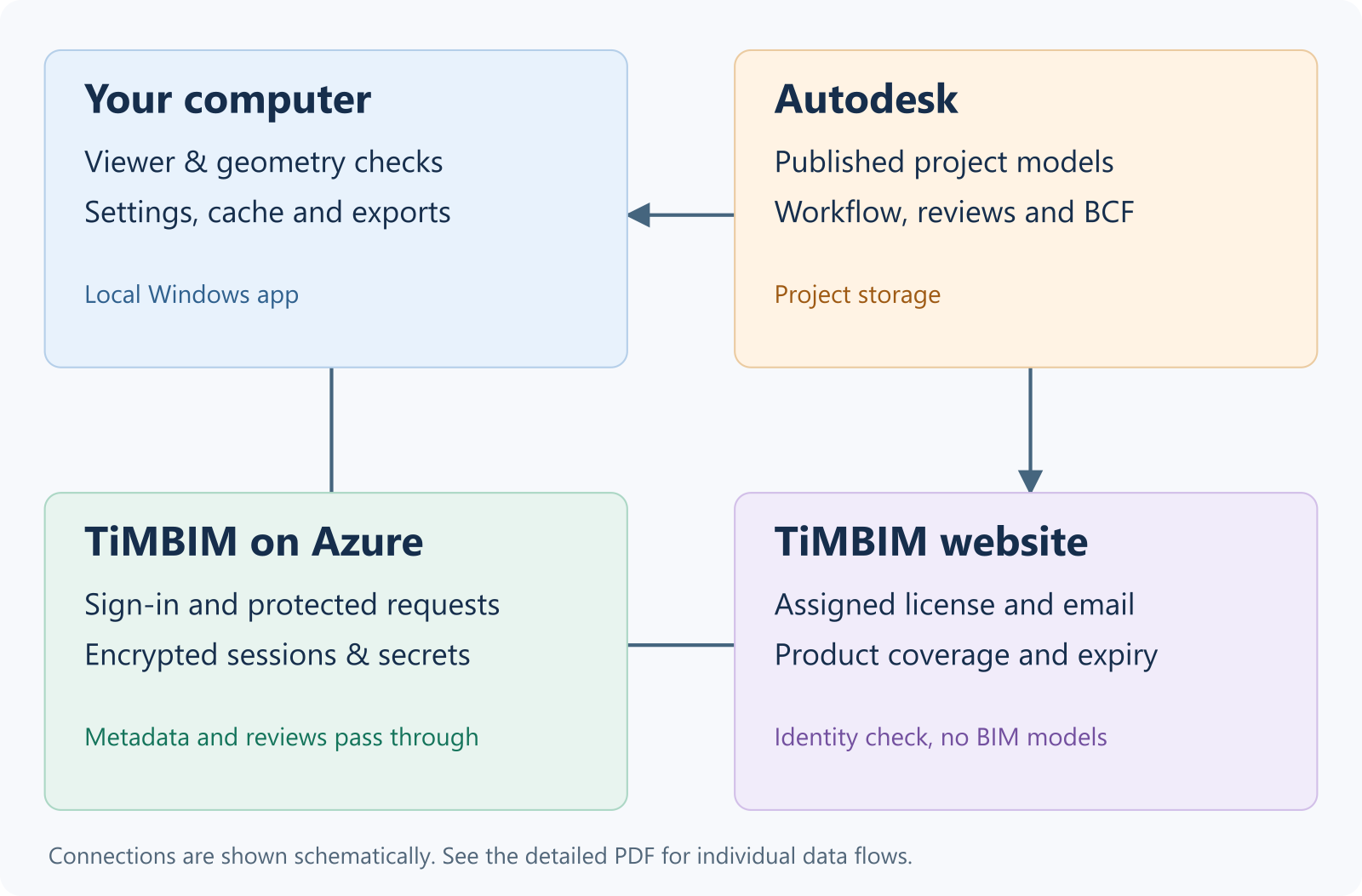
| Location | Data | Purpose |
|---|---|---|
| Your Windows computer | Unit/display preferences, column and color choices, local missing-source-unit assignments, Windows-encrypted sign-in credential, viewer/browser cache, cached BoQ presets, project settings and drafts, locally imported meeting extracts and exports you save. | Run the app, display and inspect geometry, remember preferences and create local outputs. |
| Autodesk project storage | Published BIM models and properties; workflow configuration; reviewer assignments; review comments, decisions, identity, timestamps and version context; generated BCF exchange files, which can contain opening screenshots. | Project collaboration and traceable opening review within your project. |
| TiMBIM Azure service | Encrypted sign-in sessions containing Autodesk identity and tokens. The service handles project metadata and review requests, including opening snapshots during BCF synchronization, and reads Data Connector extract information for online meeting reports. Short-lived license results are cached in memory. Private integration secrets are held separately in Azure Key Vault. | Secure Autodesk sign-in, license enforcement and protected project/review operations. Azure is not a separate BIM-model repository in this architecture. |
| TiMBIM licensing website | License records and assigned emails, product coverage, status, expiry and validation history maintained by the existing licensing system. | Verify that the signed-in Autodesk user has a valid assigned seat. |
Published model content streams directly from Autodesk to the embedded local viewer. Geometry checks, quantity calculations and PDF generation run on your computer. When you load an online meeting extract, the hosted service checks access to the extract information, and the desktop downloads the archive using the link issued by Autodesk. Meeting reports and any files you add to them are written to the PDF destination you choose.
Shared BoQ settings
If you choose a shared folder for BoQ Export, FormaTools can store presets, chapter and measurement rules, and generated Revit settings there. Access and retention follow the permissions and policies for that folder.
Sign-in and license validation.
You enter your Autodesk password with Autodesk. The hosted service receives the identity and tokens needed for the authorized connection. The desktop stores an opaque sign-in credential encrypted for your Windows user; Autodesk refresh tokens and the integration’s client secret remain server-side. A limited viewer token is supplied to the embedded viewer when required.
A signed server-to-server license request sends your Autodesk user ID, email address, requested product and app version to the TiMBIM licensing website. The website checks assigned-seat coverage, active status, a valid internal license key and expiry. A valid 30-day trial license follows the same check as paid access. A license key is not entered in, or returned to, the desktop app.
Successful license checks can be reused for up to 60 seconds, never beyond a returned license expiry. New protected requests are denied when the service cannot confirm a valid license. Autodesk project access and reviewer/administrator roles are checked separately. If access is denied, contact TiMBIM for assistance and review of the assignment.
The license check does not transfer BIM model content to the licensing website. It does not perform advertising profiling. The website’s purchase and payment processing are separate from this desktop validation request.
Why data is processed.
Identity and license data support authentication, subscription access and service administration. Project information is processed to display the content you select and perform the review or administration actions you request. Limited operational information may be processed for reliability, support and abuse prevention.
You need to provide a usable Autodesk identity and assigned-license email to use the protected service. If authorization is declined or a valid license cannot be confirmed, the relevant online features cannot be provided.
Who can receive or access data?
- Autodesk provides authentication, project APIs, published model delivery and project file storage.
- Microsoft Azure hosts the TiMBIM service, private encrypted session storage and secret storage. Configured Azure diagnostics may contain limited technical request, error, time or network information.
- The TiMBIM website and its hosting/licensing providers process license assignments and validation. Payment providers apply to purchases, not to the app’s model checking.
- Your project participants and administrators may access review records and project files according to project permissions. Review identity, comments and timestamps form part of the project history.
- Authorized TiMBIM support/service personnel may handle relevant information where needed to operate the service or resolve a support request.
Provider access, data locations, subprocessors and any international transfers depend on the organization’s Autodesk region and TiMBIM’s actual Azure and website hosting arrangements. The current draft does not promise that all processing remains in Belgium or the EU. TiMBIM must identify relevant locations and transfer safeguards before final publication.
Retention, sign-out and deletion.
| Data | Implemented behavior / policy to confirm |
|---|---|
| Sign-in session | Validity is limited to 14 days, subject to earlier Autodesk expiry/revocation. Successful server sign-out removes the active session record; physical cleanup of expired/unvisited records, storage versions, soft-deleted data and backups requires a separately confirmed retention configuration. |
| License cache | A successful result is cached in memory for at most 60 seconds and no later than license expiry. |
| Website license and validation records | Controlled by the existing website licensing system. The specific history-retention period and business-record obligations still need to be confirmed; no unverified deletion deadline is promised here. |
| Project reviews and BCF files | Retained in Autodesk project storage under the project owner’s policy. Signing out or uninstalling FormaTools does not delete project history. |
| Local settings, cache, BoQ drafts and exports | Remain in your Windows profile or the export location you choose until removed. Shared BoQ files follow the policy for the selected folder. Signing out is not a wipe of browser caches or saved exports. |
| Hosting diagnostics and backups | Depend on enabled services and settings. TiMBIM must confirm the collected categories and actual retention periods before final publication. |
Signing out of FormaTools does not sign you out of Autodesk in your browser or revoke Autodesk consent. If the service is unreachable, ask support about server-session termination. You can manage application authorization through the applicable Autodesk account controls.
Protection measures.
The customer app connects to the hosted service over HTTPS. Server sessions are encrypted, integration secrets are kept separately, website license requests are signed, and Windows encryption protects the saved desktop credential. Access to protected actions is verified on the service. These measures reduce risk; they are not a guarantee against every form of unauthorized access.
Infrastructure should not log callback query strings, authorization codes, tokens, license keys, raw Autodesk response bodies or license-request bodies. TiMBIM must verify that optional hosting diagnostics follow this configuration. Never include those values in support messages.
The bundled page pack adds no analytics scripts, tracking pixels, forms or third-party fonts. The live WordPress theme, other plugins, Autodesk sign-in and Microsoft components have their own storage/cookie behavior; review the website’s separate cookie and privacy information.
Your choices and rights.
Contact info@timbim.eu to ask about processing or request access, correction, erasure, restriction, portability or objection where applicable. Rights depend on the relevant legal conditions; some records may need to be retained for legal or project-record obligations. We may need to verify your identity and coordinate with the project owner for project-controlled records.
You can also complain to the competent data-protection authority, including the Belgian Data Protection Authority. See the European Commission’s explanation of data-protection rights.
TiMBIM will update this notice when the service’s processing changes. The final notice should carry its actual publication/update date.